介绍
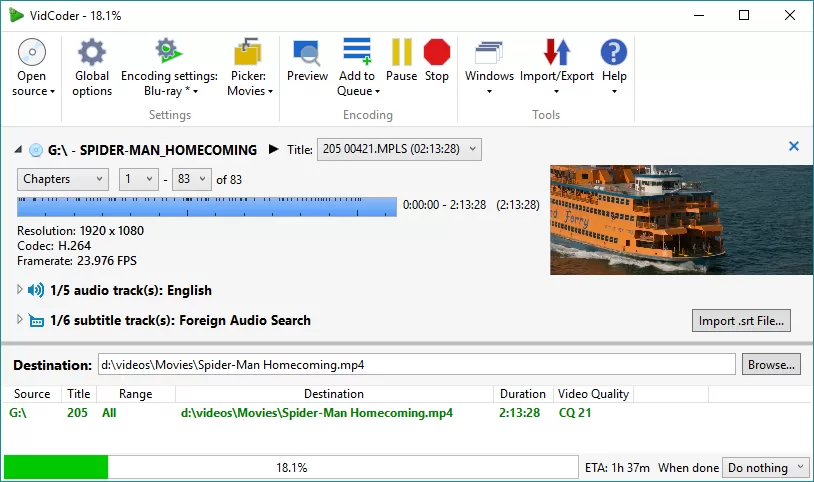
VidCoder 是适用于 Windows 的开源 DVD/蓝光翻录和视频转码应用程序。 它使用 HandBrake 作为其编码引擎。Vidcoder 是一款免费开源的视频下载、编辑、配字幕、上传于一体的工具,能应用于DVD/蓝光视频的抓取和转码操作,更重要的是可以导入字幕并进行校队,目前支持中文语言包,操作上更显便捷。
软件截图
软件特点
多线程
MP4、MKV 容器
完全集成的编码管道:一切都在一个过程中,没有巨大的中间临时文件
H.264、H.265、MPEG-4、MPEG-2、VP8、Theora 视频
使用 AMD VCE、Nvidia NVENC 和 Intel QuickSync 进行硬件加速编码
AAC、MP3、Vorbis、AC3、FLAC 音频编码和 AAC/AC3/MP3/DTS/DTS-HD 直通
视频的目标比特率、大小或质量
2遍编码
解码、电视转播、去隔行、旋转、反射、色度平滑、色彩空间过滤器
强大的批量编码与同步编码
可自定义的选择器以自动选择音频和字幕轨道、目的地、标题等
即时源预览
创建小的编码预览剪辑
暂停,恢复编码
更新日志
12.10
- Added a Hardware tab to Global Settings: this shows all available hardware and the codecs they can encode to.
- Added the ability to configure hardware decoding for Media Foundation.
- Moved QSV hardware decoding settings to the Hardware tab, added the ability to configure use for non-QSV codecs.
- Increased NVEnc simultaneous device cap from 3 to 5.
- Added requirement for encoder to be NVEnc to use NVDec
- Added code to avoid clobbering a chosen hardware decoding setting.
- Implemented QSV hyperencode.
- Added support for QSV load balancing.
- Changed to close the source video when deleting the source file, rather than stopping the source deletion from happening.
- Fixed an issue preventing “stop” from being used on individual queue items
- Fixed default/burn in selection for automatically added external subtitle files.
- Updated HandBrake core to 1.10.2
下载地址
© 版权声明
文章版权归作者所有,未经允许请勿转载。
THE END